Brush Ninja Version 2
It’s been a while since I’ve posted here. But I’ve been thinking a lot about the future of Brush Ninja over the last few months.
As I mentioned last time, I’ve had to prioritise earning a living. Brush Ninja just about covers costs, but as a project I love it so I want to keep it going. But I now have some time available so I’m going to start reworking it.
Plans
One of the big things I want to do is rewrite the code for Brush Ninja. From a users perspective this won’t make much difference, but I have learnt a lot about JavaScript over the last couple of years and I think I could make the code simpler, and easier to extend. And this will make it much easier to add new features!
So what new features will I add? Well; I have an ‘ideas’ form on the site, and I hope to add some of the most frequently requested suggestions. One of which is adding more colours. The reason for the current design is I wanted Brush Ninja to be really simple and easy to use, but I’ve now worked out a nice way to keep the simplicity and expand the amount of colours available.
Anything else? I have lots of things planned but I don’t want to promise anything until I know I can complete them. I’m going to try to update the blog more regularly as I develop things.
Testing
I have a Patreon, this is a way for people to support the development of Brush Ninja. You can join the Patreon for as little as $1 a month. And once I have the first beta online I will be sending it to the Patreon members to test.
The beta will be rolled out in stages. Starting with the drawing tools and adding new things as I go; and my Patreon supporters will get to test these things before anyone else.
Preview
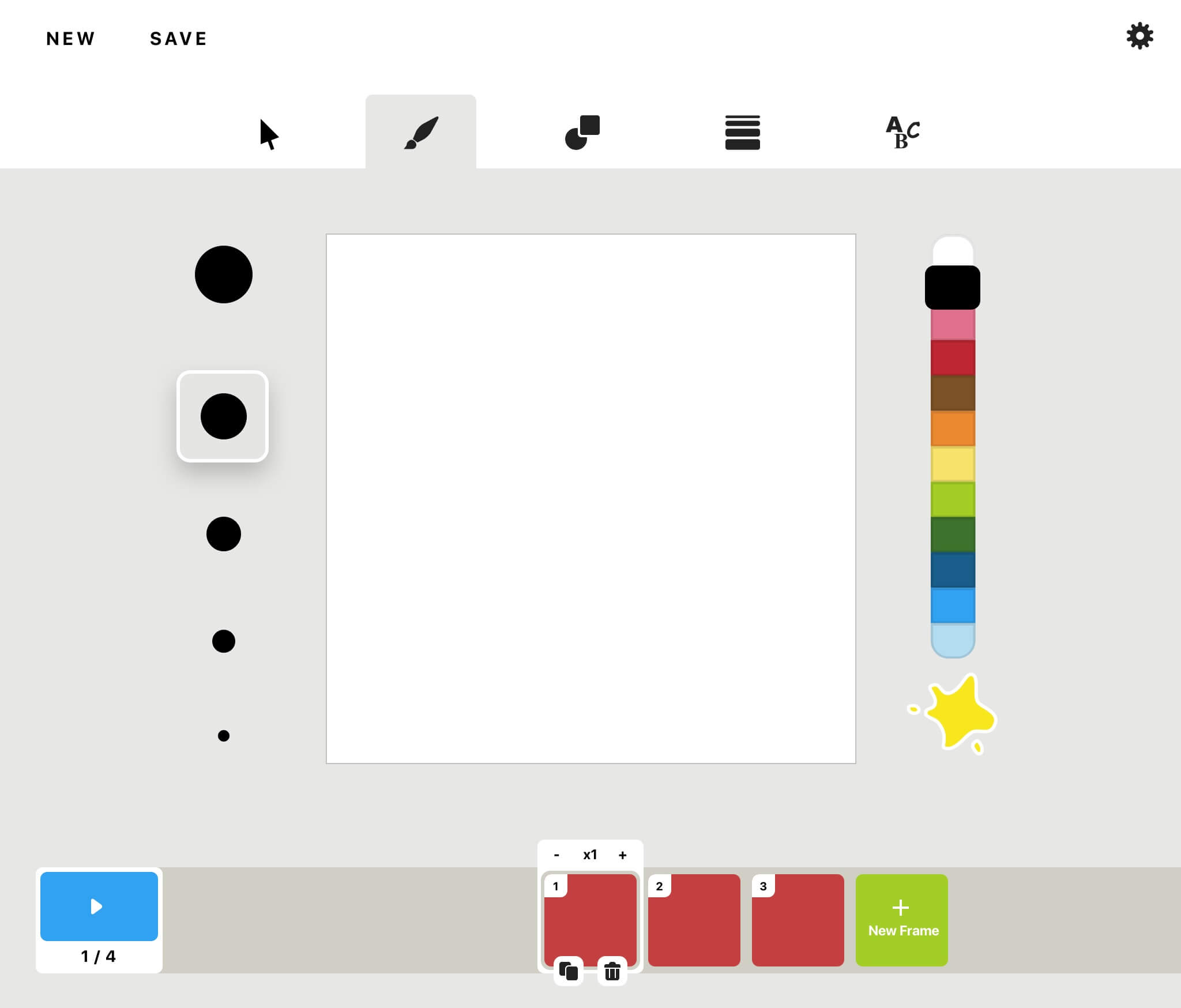
Below is a sketch I have made showing how I imagine the new Brush Ninja might look. This is an early drawing and things will likely change. The timeline in particular is likely to change quite a bit, but this will give you an idea of what some of the new features I have planned.
← Making Brush Ninja SustainableNew Drawing Tools →
Related Posts
Shape Palette
13 May 2020
In Brush Ninja Classic (the current version), you can draw rectangles, circles, triangles and stars. Brush Ninja v2 allows so much more. This feature actually came about by accident. I had added the basic shape drawing functionality to Brush Ninja v2, and then wanted to add a heart shape. Which...
Recent Brush Ninja Updates
29 March 2019
I’ve not posted on the blog much recently, but Brush Ninja has not stood still. In this post I will explain some of the things I have been working on over the last few months. Transform Tools I have added the ability to scale, rotate and move the images you...
Brush Ninja Version 2 Live!!
13 January 2021
I spent a good amount of time last year rewriting Brush Ninja to use a new graphic engine, and to add a whole stack of features. It was hard work, but it’s been well worth it and it’s now available for everyone to use! What’s new? The drawing engine is...
 Blog RSS Feed