<?xml version="1.0" encoding="utf-8"?><feed xmlns="http://www.w3.org/2005/Atom" ><generator uri="https://jekyllrb.com/" version="4.3.4">Jekyll</generator><link href="https://brush.ninja/feed.xml" rel="self" type="application/atom+xml" /><link href="https://brush.ninja/" rel="alternate" type="text/html" /><updated>2026-06-03T23:51:29+01:00</updated><id>https://brush.ninja/feed.xml</id><title type="html">Brush Ninja</title><subtitle>A Free Hand-drawn Animated Gif creator.</subtitle><entry><title type="html">Introducing Brush Ninja Stop Motion Maker</title><link href="https://brush.ninja/blog/stop-motion-animation/" rel="alternate" type="text/html" title="Introducing Brush Ninja Stop Motion Maker" /><published>2026-05-14T00:00:00+01:00</published><updated>2026-05-14T00:00:00+01:00</updated><id>https://brush.ninja/blog/stop-motion-animation</id><content type="html" xml:base="https://brush.ninja/blog/stop-motion-animation/"><![CDATA[<p>Brush Ninja now includes a free online <a href="/create/stop-motion-animation/">Stop Motion Animation Maker</a>.</p>

<p>You can create stop motion animations directly in your browser using toys, LEGO, paper cutouts, clay models, drawings, or anything else you can point a camera at. Capture frames one at a time, preview your animation instantly, and export the finished result as a GIF.</p>

<p>Like the original Brush Ninja Animation Maker, the new stop motion tool is designed to be simple, beginner-friendly, and accessible on both desktop and mobile devices.</p>

<p>It includes features like:</p>

<ul>
  <li>Frame reordering</li>
  <li>Adjustable frame timing</li>
  <li>Onion skinning</li>
  <li>Mobile camera support</li>
  <li>GIF export</li>
</ul>

<p>Stop motion works differently from traditional frame-by-frame animation. Instead of drawing every frame, you animate real-world objects by moving them slightly between photos. It’s a great way to introduce animation in classrooms, creative clubs, and at home.</p>

<p>Try it here:</p>

<p><a href="/create/stop-motion-animation/">Brush Ninja Stop Motion Maker →</a></p>

<p>If you’d rather draw your animations by hand, you can still use the original <a href="/create/animation-maker/">Brush Ninja Animation Maker →</a>.</p>]]></content><author><name></name></author><summary type="html"><![CDATA[Brush Ninja now includes a free online Stop Motion Animation Maker. You can create stop motion animations directly in your browser using toys, LEGO, paper cutouts, clay models, drawings, or anything else you can point a camera at. Capture frames one at a time, preview your animation instantly, and export the finished result as a GIF. Like the original Brush Ninja Animation Maker, the new stop motion tool is designed to be simple, beginner-friendly, and accessible on both desktop and mobile devices. It includes features like: Frame reordering Adjustable frame timing Onion skinning Mobile camera support GIF export Stop motion works differently from traditional frame-by-frame animation. Instead of drawing every frame, you animate real-world objects by moving them slightly between photos. It’s a great way to introduce animation in classrooms, creative clubs, and at home. Try it here: Brush Ninja Stop Motion Maker → If you’d rather draw your animations by hand, you can still use the original Brush Ninja Animation Maker →.]]></summary><media:thumbnail xmlns:media="http://search.yahoo.com/mrss/" url="https://brush.ninja/assets/images/ninja/header-logo-social.png" /><media:content medium="image" url="https://brush.ninja/assets/images/ninja/header-logo-social.png" xmlns:media="http://search.yahoo.com/mrss/" /></entry><entry><title type="html">New Free Teacher Downloads and Classroom Resources</title><link href="https://brush.ninja/blog/teachers-downloads/" rel="alternate" type="text/html" title="New Free Teacher Downloads and Classroom Resources" /><published>2026-05-13T00:00:00+01:00</published><updated>2026-05-13T00:00:00+01:00</updated><id>https://brush.ninja/blog/teachers-downloads</id><content type="html" xml:base="https://brush.ninja/blog/teachers-downloads/"><![CDATA[<p>As well as <a href="/teacher-guides/">teacher guides</a>, Brush Ninja now includes a growing collection of free teacher downloads and classroom resources for animation projects, creative activities, and lessons.</p>

<p>The new downloads section includes printable PDFs, planning sheets, and hands-on creative tools designed for schools, clubs, libraries, and families. Everything is free to use and works alongside the Brush Ninja animation and stop motion tools.</p>

<p>Current resources include:</p>

<ul>
  <li>A printable Teacher Guide with animation lessons and classroom activities</li>
  <li>An Animation Glossary explaining common animation terms and techniques</li>
  <li>A Storyboard Template for planning scenes and timing</li>
  <li>Free Educational Clipart for worksheets, posters, and presentations</li>
  <li>A printable Paper Toy activity for creative classroom fun</li>
</ul>

<p>The goal is to make animation more accessible and easier to introduce in creative learning environments, even for complete beginners.</p>

<p>You can explore the downloads here:</p>

<p><a href="/teacher-guides/download/">Teacher Downloads and Resources →</a></p>]]></content><author><name></name></author><summary type="html"><![CDATA[As well as teacher guides, Brush Ninja now includes a growing collection of free teacher downloads and classroom resources for animation projects, creative activities, and lessons. The new downloads section includes printable PDFs, planning sheets, and hands-on creative tools designed for schools, clubs, libraries, and families. Everything is free to use and works alongside the Brush Ninja animation and stop motion tools. Current resources include: A printable Teacher Guide with animation lessons and classroom activities An Animation Glossary explaining common animation terms and techniques A Storyboard Template for planning scenes and timing Free Educational Clipart for worksheets, posters, and presentations A printable Paper Toy activity for creative classroom fun The goal is to make animation more accessible and easier to introduce in creative learning environments, even for complete beginners. You can explore the downloads here: Teacher Downloads and Resources →]]></summary><media:thumbnail xmlns:media="http://search.yahoo.com/mrss/" url="https://brush.ninja/assets/images/ninja/header-logo-social.png" /><media:content medium="image" url="https://brush.ninja/assets/images/ninja/header-logo-social.png" xmlns:media="http://search.yahoo.com/mrss/" /></entry><entry><title type="html">A Tiny Retro Camera for the Web</title><link href="https://brush.ninja/blog/pixel-camera/" rel="alternate" type="text/html" title="A Tiny Retro Camera for the Web" /><published>2026-04-10T00:00:00+01:00</published><updated>2026-04-10T00:00:00+01:00</updated><id>https://brush.ninja/blog/pixel-camera</id><content type="html" xml:base="https://brush.ninja/blog/pixel-camera/"><![CDATA[<p>I’ve added a small new toy to Brush Ninja: a browser-based <a href="/create/pixel-camera/">pixel camera</a> with a deliberately retro feel. It’s inspired by oddball hardware like the Game Boy Camera and the general charm of early digital photography.</p>

<p>The aim isn’t high-resolution, perfect photos. Instead, it’s about character. You pick a look, point your camera, and take a shot. The limited colours and playful effects give each photo a bit of personality. It feels more like messing around with a toy camera than using a modern phone.</p>

<p>There’s also a <a href="/camera/">simplified, fullscreen version</a> that works nicely on mobile. It’s stripped back to just the camera and the controls, which makes it feel more like its own little gadget.</p>

<p>This is only version one. I plan to add more effects and options over time, but I wanted to get something simple and fun out first. Try it out, see what weird and wonderful things you can capture, and let me know what you make.</p>]]></content><author><name></name></author><summary type="html"><![CDATA[I’ve added a small new toy to Brush Ninja: a browser-based pixel camera with a deliberately retro feel. It’s inspired by oddball hardware like the Game Boy Camera and the general charm of early digital photography. The aim isn’t high-resolution, perfect photos. Instead, it’s about character. You pick a look, point your camera, and take a shot. The limited colours and playful effects give each photo a bit of personality. It feels more like messing around with a toy camera than using a modern phone. There’s also a simplified, fullscreen version that works nicely on mobile. It’s stripped back to just the camera and the controls, which makes it feel more like its own little gadget. This is only version one. I plan to add more effects and options over time, but I wanted to get something simple and fun out first. Try it out, see what weird and wonderful things you can capture, and let me know what you make.]]></summary><media:thumbnail xmlns:media="http://search.yahoo.com/mrss/" url="https://brush.ninja/assets/images/ninja/header-logo-social.png" /><media:content medium="image" url="https://brush.ninja/assets/images/ninja/header-logo-social.png" xmlns:media="http://search.yahoo.com/mrss/" /></entry><entry><title type="html">Improving the Paint Ninja Drawing App</title><link href="https://brush.ninja/blog/paint-ninja-updates/" rel="alternate" type="text/html" title="Improving the Paint Ninja Drawing App" /><published>2026-04-06T00:00:00+01:00</published><updated>2026-04-06T00:00:00+01:00</updated><id>https://brush.ninja/blog/paint-ninja-updates</id><content type="html" xml:base="https://brush.ninja/blog/paint-ninja-updates/"><![CDATA[<p>I’ve been quietly working on improving the <a href="/create/drawing/">Brush Ninja drawing app</a> over the past few weeks. Nothing flashy on the surface, but lots of small upgrades that make it nicer to use.</p>

<p>There are a few new features, along with some general code tidy up to fix bugs and improve performance.</p>

<p>The biggest change is the addition of layers. You can now draw on separate layers, hide them, and build up your artwork in stages. It opens the door to more complex drawings without making things harder to manage, and it sets things up nicely for future features.</p>

<p>There’s also a brand new smudge tool. This lets you push colours around the canvas, a bit like dragging wet paint with your finger. It’s surprisingly fun. You can soften edges, blend colours, or just make a mess and see what happens.</p>

<p>I’ve also added a pipette tool. This one’s simple but useful. You can grab colours directly from your drawing instead of guessing or tweaking sliders. It makes it much easier to stay consistent, especially when you’re working with shading or gradients.</p>

<p>The paint brush has had some attention too. It feels smoother and more responsive, especially when drawing longer lines. There’s automatic smoothing to reduce jitter, better spacing, and it behaves more like you’d expect.</p>

<p>Overall, this is a solid step forward. The app still aims to stay simple and approachable, but it now has a bit more depth if you want it. Paint Ninja is still in beta, so I’m keen to keep improving it based on feedback and how people actually use it.</p>

<p>As with everything on Brush Ninja, it’s free to use, and there’s no account or sign up required. Just head over to the <a href="/create/drawing/">drawing app</a> and give it a try.</p>]]></content><author><name></name></author><summary type="html"><![CDATA[I’ve been quietly working on improving the Brush Ninja drawing app over the past few weeks. Nothing flashy on the surface, but lots of small upgrades that make it nicer to use. There are a few new features, along with some general code tidy up to fix bugs and improve performance. The biggest change is the addition of layers. You can now draw on separate layers, hide them, and build up your artwork in stages. It opens the door to more complex drawings without making things harder to manage, and it sets things up nicely for future features. There’s also a brand new smudge tool. This lets you push colours around the canvas, a bit like dragging wet paint with your finger. It’s surprisingly fun. You can soften edges, blend colours, or just make a mess and see what happens. I’ve also added a pipette tool. This one’s simple but useful. You can grab colours directly from your drawing instead of guessing or tweaking sliders. It makes it much easier to stay consistent, especially when you’re working with shading or gradients. The paint brush has had some attention too. It feels smoother and more responsive, especially when drawing longer lines. There’s automatic smoothing to reduce jitter, better spacing, and it behaves more like you’d expect. Overall, this is a solid step forward. The app still aims to stay simple and approachable, but it now has a bit more depth if you want it. Paint Ninja is still in beta, so I’m keen to keep improving it based on feedback and how people actually use it. As with everything on Brush Ninja, it’s free to use, and there’s no account or sign up required. Just head over to the drawing app and give it a try.]]></summary><media:thumbnail xmlns:media="http://search.yahoo.com/mrss/" url="https://brush.ninja/assets/images/ninja/header-logo-social.png" /><media:content medium="image" url="https://brush.ninja/assets/images/ninja/header-logo-social.png" xmlns:media="http://search.yahoo.com/mrss/" /></entry><entry><title type="html">Building Better Teacher Guides for Brush Ninja</title><link href="https://brush.ninja/blog/teachers-guides/" rel="alternate" type="text/html" title="Building Better Teacher Guides for Brush Ninja" /><published>2026-02-02T00:00:00+00:00</published><updated>2026-02-02T00:00:00+00:00</updated><id>https://brush.ninja/blog/teachers-guides</id><content type="html" xml:base="https://brush.ninja/blog/teachers-guides/"><![CDATA[<p>Over the years, I’ve been really pleased to see how many teachers use Brush Ninja in their classrooms. I regularly hear from people using it for science explanations, storytelling, revision, and creative projects.</p>

<p>What I’ve also noticed is that many teachers end up figuring things out on their own. How to run a first lesson. How to collect work. How to manage files. How to give feedback. None of this is difficult, but it takes time to work out.</p>

<p>So I’ve started building a new set of <strong>Teacher Guides</strong> to make this easier.</p>

<p>The aim is simple: practical, realistic advice. No jargon. No complex systems. Just clear ways to use Brush Ninja with in the classroom.</p>

<p>These guides focus on how things actually work in schools:</p>

<ul>
  <li>Running a first animation lesson</li>
  <li>Using Brush Ninja without student accounts</li>
  <li>Managing and naming files</li>
  <li>Collecting and sharing work</li>
  <li>Giving useful feedback</li>
  <li>Exporting projects reliably</li>
</ul>

<p>They are designed to work with the way most schools already operate, rather than trying to replace existing systems. I’m starting with the basics and building from there. Over time, I’ll add more technical guides and more teaching ideas, based on real questions and feedback.</p>

<p>You can find the first set of guides here:</p>

<p>👉 <strong><a href="/teacher-guides/">Teacher Guides</a></strong></p>

<p>If you’re using Brush Ninja in your classroom and have ideas for guides you’d find useful, feel free to get in touch. These resources are meant to grow alongside the way people actually use the site.</p>

<p>More coming soon.</p>]]></content><author><name></name></author><summary type="html"><![CDATA[Why I’m creating a new set of practical teacher guides for using Brush Ninja in the classroom.]]></summary><media:thumbnail xmlns:media="http://search.yahoo.com/mrss/" url="https://brush.ninja/assets/images/ninja/header-logo-social.png" /><media:content medium="image" url="https://brush.ninja/assets/images/ninja/header-logo-social.png" xmlns:media="http://search.yahoo.com/mrss/" /></entry><entry><title type="html">Making Brush Ninja More Accessible</title><link href="https://brush.ninja/2025/accessibility/" rel="alternate" type="text/html" title="Making Brush Ninja More Accessible" /><published>2025-11-06T00:00:00+00:00</published><updated>2025-11-06T00:00:00+00:00</updated><id>https://brush.ninja/2025/accessibility</id><content type="html" xml:base="https://brush.ninja/2025/accessibility/"><![CDATA[<p>I’ve been working to make Brush Ninja easier and more accessible for everyone. Accessibility is something I care about because creativity should be open to all, no matter how people interact with technology.</p>

<p>To show my commitment, I’ve created a new <a href="/accessibility/">Accessibility page</a> that outlines the features currently in place and links to the full VPAT <strong>(Voluntary Product Accessibility Template)</strong> report. The VPAT goes into detail about how Brush Ninja meets various accessibility standards and where I can still improve.</p>

<p>While working on this update, I also took the opportunity to simplify the interface of the <a href="/create/animation-maker/">Animation Maker</a> a little. The old Group and Ungroup options have been removed, as they often caused confusion and regularly caused animation to be a lot slower than they should be. I have kept in the Merge option which does the same as the Group option, but much is much quicker and will stop your animations from feeling sluggish.</p>

<p>If you prefer the old behaviour, you can re-enable Group and Ungroup in the Brush Ninja Animation Maker Settings.</p>

<p>Accessibility improvements are an ongoing process, and I’ll keep refining things over time. If you run into any issues or have feedback, I’d love to hear from you — it really helps me make Brush Ninja better for everyone.</p>]]></content><author><name></name></author><summary type="html"><![CDATA[I’ve been working to make Brush Ninja easier and more accessible for everyone. Accessibility is something I care about because creativity should be open to all, no matter how people interact with technology. To show my commitment, I’ve created a new Accessibility page that outlines the features currently in place and links to the full VPAT (Voluntary Product Accessibility Template) report. The VPAT goes into detail about how Brush Ninja meets various accessibility standards and where I can still improve. While working on this update, I also took the opportunity to simplify the interface of the Animation Maker a little. The old Group and Ungroup options have been removed, as they often caused confusion and regularly caused animation to be a lot slower than they should be. I have kept in the Merge option which does the same as the Group option, but much is much quicker and will stop your animations from feeling sluggish. If you prefer the old behaviour, you can re-enable Group and Ungroup in the Brush Ninja Animation Maker Settings. Accessibility improvements are an ongoing process, and I’ll keep refining things over time. If you run into any issues or have feedback, I’d love to hear from you — it really helps me make Brush Ninja better for everyone.]]></summary><media:thumbnail xmlns:media="http://search.yahoo.com/mrss/" url="https://brush.ninja/assets/images/ninja/header-logo-social.png" /><media:content medium="image" url="https://brush.ninja/assets/images/ninja/header-logo-social.png" xmlns:media="http://search.yahoo.com/mrss/" /></entry><entry><title type="html">Particle Flow Fields and Beep8</title><link href="https://brush.ninja/2025/09/18/flow-fields-beep8/" rel="alternate" type="text/html" title="Particle Flow Fields and Beep8" /><published>2025-09-18T00:00:00+01:00</published><updated>2025-09-18T00:00:00+01:00</updated><id>https://brush.ninja/2025/09/18/flow-fields-beep8</id><content type="html" xml:base="https://brush.ninja/2025/09/18/flow-fields-beep8/"><![CDATA[<p>It’s been a little while since the last post here — a little over a year in fact! While things have been a bit quiet publicly, I haven’t been completely idle.</p>

<p>The <a href="/create/animation-maker/">Brush Ninja animation app</a> has had a few minor bug fixes and updates. Nothing dramatic, but enough to keep it running smoothly for everyone who uses it.</p>

<p>More recently, I’ve been experimenting with something new: a <a href="/play/particle-flow-field/">Particle Flow Fields app</a>. It’s a playful little tool where you can watch particles swirl, spiral, and drift through different mathematical patterns. You can try it out now on the site and see what kinds of flows you can create.</p>

<p>I’ve also been busy with <a href="https://beep8.com">beep8</a> and <a href="https://beepmini.com">beepmini</a> — my retro-inspired game engines. Alongside them, I’ve been making a <a href="https://beepmini.com/games/">bunch of games</a> to show what they can do. The next step is a built-in <strong>game making app</strong>, so you’ll be able to tinker with your own creations directly.</p>

<p>All of these projects live on their own websites at the moment, but I’m also thinking about bringing some of the tools into <strong>Brush Ninja</strong>. It could be fun to have everything in one place.</p>

<p>Thanks for sticking around — more updates (and toys to play with) soon!</p>]]></content><author><name></name></author><summary type="html"><![CDATA[It’s been a little while since the last post here — a little over a year in fact! While things have been a bit quiet publicly, I haven’t been completely idle. The Brush Ninja animation app has had a few minor bug fixes and updates. Nothing dramatic, but enough to keep it running smoothly for everyone who uses it. More recently, I’ve been experimenting with something new: a Particle Flow Fields app. It’s a playful little tool where you can watch particles swirl, spiral, and drift through different mathematical patterns. You can try it out now on the site and see what kinds of flows you can create. I’ve also been busy with beep8 and beepmini — my retro-inspired game engines. Alongside them, I’ve been making a bunch of games to show what they can do. The next step is a built-in game making app, so you’ll be able to tinker with your own creations directly. All of these projects live on their own websites at the moment, but I’m also thinking about bringing some of the tools into Brush Ninja. It could be fun to have everything in one place. Thanks for sticking around — more updates (and toys to play with) soon!]]></summary><media:thumbnail xmlns:media="http://search.yahoo.com/mrss/" url="https://brush.ninja/assets/images/ninja/header-logo-social.png" /><media:content medium="image" url="https://brush.ninja/assets/images/ninja/header-logo-social.png" xmlns:media="http://search.yahoo.com/mrss/" /></entry><entry><title type="html">Emoji Art Gallery Update</title><link href="https://brush.ninja/blog/updates-emoji-art/" rel="alternate" type="text/html" title="Emoji Art Gallery Update" /><published>2024-05-07T11:59:54+01:00</published><updated>2024-05-07T11:59:54+01:00</updated><id>https://brush.ninja/blog/updates-emoji-art</id><content type="html" xml:base="https://brush.ninja/blog/updates-emoji-art/"><![CDATA[<p>Today I have spent some time tidying up the <a href="/create/emoji-art/">Emoji Art Maker</a>, I’ve tweaked the app to improve the usability, and I’ve updated <a href="/gallery/emoji-art/">the emoji art gallery</a>.</p>

<h2 id="app-tweaks">App Tweaks</h2>

<p>Besides some niceties like changing the color of the background button to match the current color of the background, I have also added undo and redo buttons. These buttons are a small but important change to the usability of the app allowing to make mistakes and easily correct them.</p>

<h2 id="gallery-update">Gallery Update</h2>

<p>The gallery has had a big update. You can find the gallery on the <a href="/create/emoji-art/">Emoji Art Maker</a>, and on the <a href="/gallery/emoji-art/">gallery page</a>.</p>

<p>Firstly I have added more gallery exibits, there’s so much potential in the emoji art app and I wanted to show the potential of the app with new examples.</p>

<p>Secondly, and more importantly, I have added a new feature to the gallery. You can now click “edit this” on any gallery item and it will open the emoji art app with that gallery item loaded. This means you can change all of these images and make them your own.</p>

<p>My thought is that this will help people who aren’t sure how to do things with the emoji art maker by removing the blank canvas. I think this is really fun and I hope you enjoy it too.</p>

<h2 id="share-your-art">Share your art!</h2>

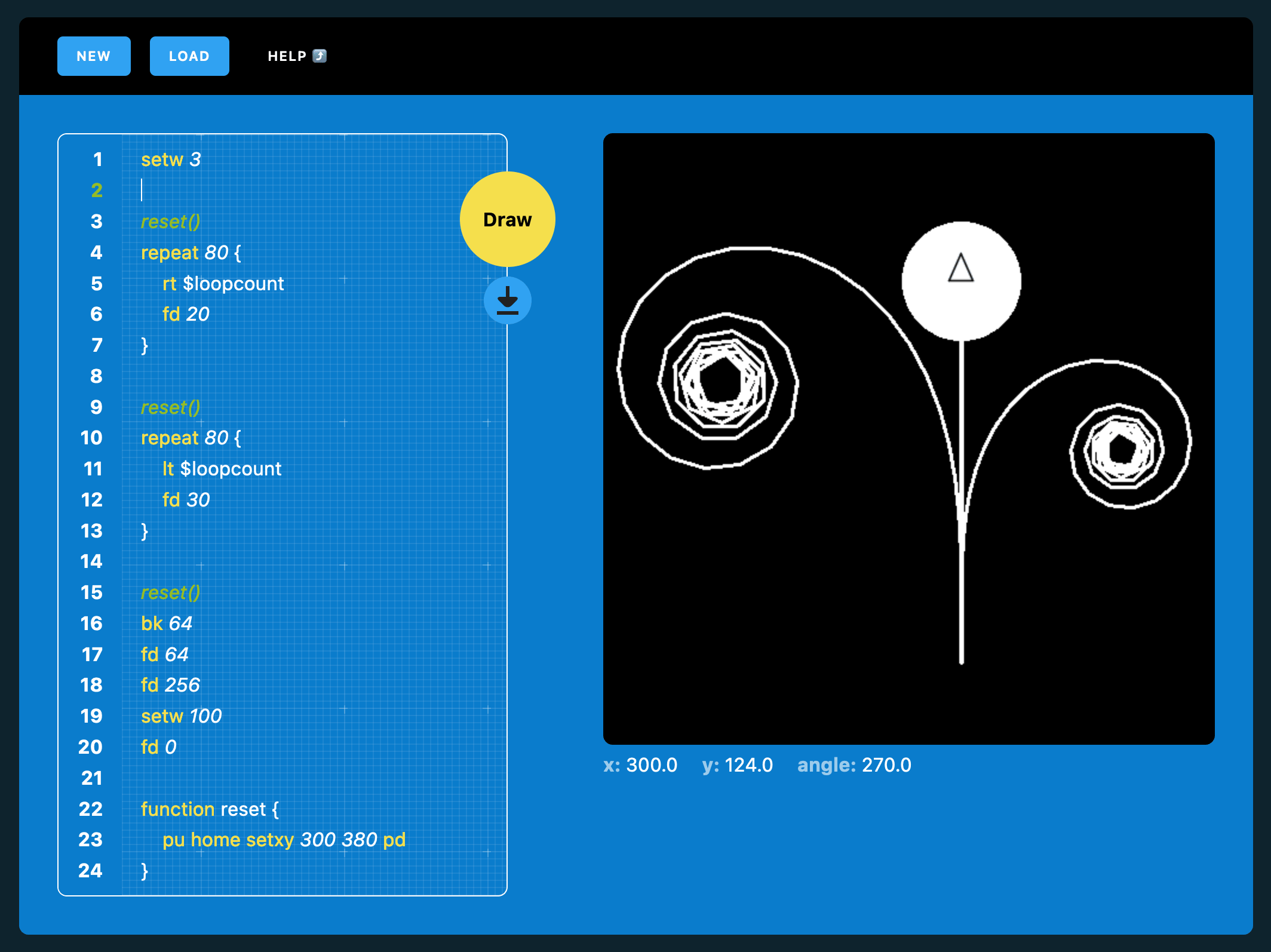
<p>If you share your art on social media please use the <em>#brushninja</em> hashtag so I can find it easily and share it with others. If I really like what you’re done I might even add it to the gallery!</p>]]></content><author><name></name></author><category term="News" /><category term="Emoji Art" /><summary type="html"><![CDATA[Code Ninja variables now available in Code Ninja 2D!]]></summary><media:thumbnail xmlns:media="http://search.yahoo.com/mrss/" url="https://brush.ninja/assets/images/ninja/header-logo-social.png" /><media:content medium="image" url="https://brush.ninja/assets/images/ninja/header-logo-social.png" xmlns:media="http://search.yahoo.com/mrss/" /></entry><entry><title type="html">New Feature: Code Ninja Variables</title><link href="https://brush.ninja/blog/new-feature-code-ninja-variables/" rel="alternate" type="text/html" title="New Feature: Code Ninja Variables" /><published>2023-08-06T11:59:54+01:00</published><updated>2023-08-06T11:59:54+01:00</updated><id>https://brush.ninja/blog/new-feature:-code-ninja-variables</id><content type="html" xml:base="https://brush.ninja/blog/new-feature-code-ninja-variables/"><![CDATA[<p>Today, I am thrilled to share with you an exciting new feature that has been added to <a href="/create/2d-code/">Code Ninja</a> - <strong>Code Ninja Variables</strong>! This latest addition empowers you to take your drawings to the next level by allowing you to use variables in your Code Ninja creations.</p>

<p>Using variables in your drawings opens up a whole new world of possibilities. You can now assign values to variables and manipulate them using math commands. This means you can make your more drawings dynamic by incorporating calculations into your code!</p>

<figure class="m-b4"><a href="/assets/images/blog-posts/code-ninja-variables.png" class="display-block"><img class="b-br1 display-block m-auto" src="/assets/images/blog-posts/code-ninja-variables.png" alt="An example Code Ninja script showing variables and loopcount property in action." loading="lazy" width="2128" height="1594" /></a>
	<figcaption class="m0 m-t2"><p>An example Code Ninja script showing variables and loopcount property in action.</p>
</figcaption>
	
</figure>

<p>But that’s not all! Another handy addition is the ability to access the <code class="language-plaintext highlighter-rouge">loopCount</code> from repeat commands. With this feature, you can see how many times a particular section of code loops, and use that value as a variable to make even more interesting images.</p>

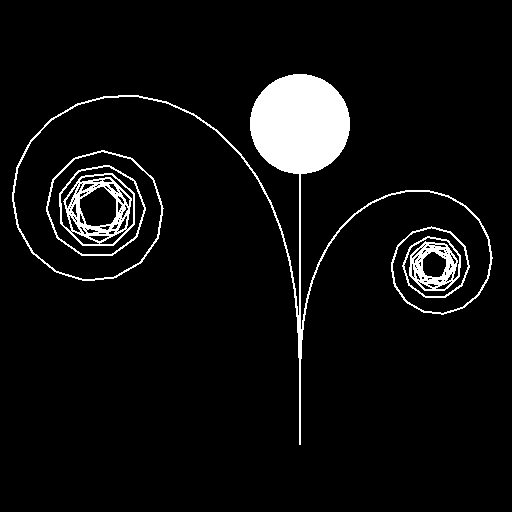
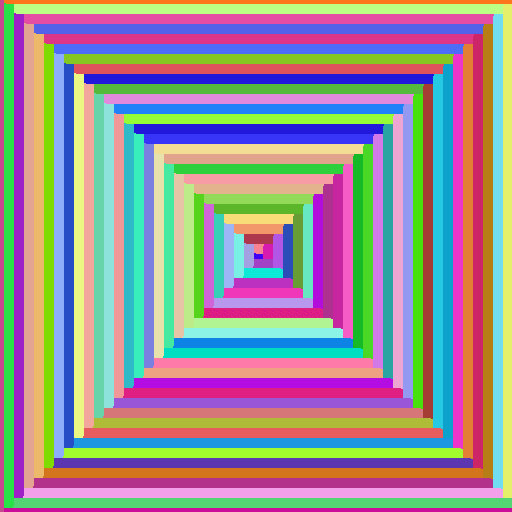
<p>To help you get started with these awesome new features, I have also added some fresh code examples showcasing how they can be used effectively. These examples will provide you with inspiration and guidance as you explore the creative potential of Code Ninja Variables.</p>

<div class="grid m-b4 t:grid-cols2">
<figure class="m-b4"><img class="b-br1 display-block m-auto" src="/assets/images-code-examples/2d/flower.png" alt="Code Ninja Flower Sample" loading="lazy" width="512" height="512" />
</figure>

<figure class="m-b4"><img class="b-br1 display-block m-auto" src="/assets/images-code-examples/2d/spiral.png" alt="Code Ninja Spiral Sample" loading="lazy" width="512" height="512" />
</figure>

<figure class="m-b4"><img class="b-br1 display-block m-auto" src="/assets/images-code-examples/2d/arcs-2.png" alt="Code Ninja Arcs Sample" loading="lazy" width="512" height="512" />
</figure>

<figure class="m-b4"><img class="b-br1 display-block m-auto" src="/assets/images-code-examples/2d/rainbow-corridor.png" alt="Code Ninja Rainbow Corridor Sample" loading="lazy" width="512" height="512" />
</figure>

</div>

<p>And there’s one more thing - I heard your requests, and I’m happy to announce that I have also included an <strong>arc command</strong> in this update! Drawing curves has never been easier. Whether it’s creating smooth lines or intricate arcs, this new command will give your drawings a whole new level of sophistication.</p>

<p>For detailed information on how to unleash the power of Code Ninja Variables and make the most out of this exciting update, be sure to check out our <a href="/help/code-ninja/2d-commands/">comprehensive documentation</a> available on our website.</p>

<p>So what are you waiting for? Dive into <a href="/create/2d-code/">Code Ninja</a> today and start exploring all the incredible things you can achieve with Code Ninja Variables. Unleash your creativity like never before!</p>]]></content><author><name></name></author><category term="News" /><category term="Code Ninja" /><summary type="html"><![CDATA[Code Ninja variables now available in Code Ninja 2D!]]></summary><media:thumbnail xmlns:media="http://search.yahoo.com/mrss/" url="https://brush.ninja/assets/images/ninja/header-logo-social.png" /><media:content medium="image" url="https://brush.ninja/assets/images/ninja/header-logo-social.png" xmlns:media="http://search.yahoo.com/mrss/" /></entry><entry><title type="html">Say Hello to Ninja Puzzles: A New Dimension of Fun and Learning</title><link href="https://brush.ninja/blog/ninja-puzzles/" rel="alternate" type="text/html" title="Say Hello to Ninja Puzzles: A New Dimension of Fun and Learning" /><published>2023-07-05T06:46:00+01:00</published><updated>2023-07-05T06:46:00+01:00</updated><id>https://brush.ninja/blog/ninja-puzzles</id><content type="html" xml:base="https://brush.ninja/blog/ninja-puzzles/"><![CDATA[<p>Welcome to Brush Ninja, your go-to destination for educational applications! We are thrilled to announce the launch of our latest addition, <a href="https://ninjapuzzles.com/">Ninja Puzzles</a>. In this blog post, I will introduce you to Ninja Puzzles and highlight the range of free downloadable puzzles that await you.</p>

<ul>
  <li><strong>Unleashing Ninja Puzzles:</strong>
At Ninja Puzzles, I believe that learning should be fun and engaging. Whether you’re a puzzle enthusiast, an educator, or simply looking for a way to exercise your brain, Ninja Puzzles has something for everyone.</li>
  <li><strong>Diving into the Puzzle Variety:</strong>
Ninja Puzzles offers a wide array of puzzle types to cater to different interests and skill levels. This includes:
    <ul>
      <li><strong>a. Sudoku:</strong> Challenge your logical thinking and number-placement skills with our <a href="https://ninjapuzzles.com/puzzles/sudoku/">Sudoku</a> puzzles. Solve the grids, unlock hidden patterns, and experience the satisfaction of completing these captivating puzzles.</li>
      <li><strong>b. Word Searches:</strong> Sharpen your vocabulary and observation skills with challenging <a href="https://ninjapuzzles.com/puzzles/word-search/">Word Searches</a>. Seek out hidden words within a grid of letters and improve your knowledge on various subjects.</li>
      <li><strong>c. Mazes:</strong> Get lost in a world of twists, turns, and dead ends with our <a href="https://ninjapuzzles.com/puzzles/maze/">engaging mazes</a>. Test your problem-solving abilities as you navigate through intricate paths.</li>
    </ul>
  </li>
  <li><strong>Engaging Learning Experience:</strong>
At Ninja Puzzles, I believe in the power of puzzles as a tool for learning and a toy for fun. The Puzzles help improve cognitive abilities, enhance critical thinking, boost memory, and provide a healthy mental workout. Whether you’re a student, teacher, or lifelong learner, Ninja Puzzles offers an engaging way to expand your knowledge while having fun.</li>
  <li><strong>User-Friendly and Free:</strong>
Ninja Puzzles is designed with user convenience in mind. We have created a user-friendly interface that allows easy navigation and seamless puzzle downloading. All our puzzles are available for free to download and print, ensuring that anyone can enjoy them without any barriers.</li>
</ul>

<p>I am excited to launch Ninja Puzzles as a fun addition to the Brush Ninja family. I want to provide a platform where learning and entertainment go hand in hand. Whether you’re seeking a mental challenge, a way to relax, or an educational resource, Ninja Puzzles has got you covered.</p>

<p>This is early days for Ninja Puzzles. I want to add a much greater variety of puzzles, with all sorts of different challenges at different difficulties, this is just the first step.</p>

<p>So, what are you waiting for? <a href="https://ninjapuzzles.com">Visit Ninja Puzzles</a> today, download your favorite puzzles, and embark on an adventure of endless fun!</p>]]></content><author><name></name></author><category term="news" /><summary type="html"><![CDATA[Free Downloadable Puzzles for Fun and Learning]]></summary><media:thumbnail xmlns:media="http://search.yahoo.com/mrss/" url="https://brush.ninja/assets/images/ninja/header-logo-social.png" /><media:content medium="image" url="https://brush.ninja/assets/images/ninja/header-logo-social.png" xmlns:media="http://search.yahoo.com/mrss/" /></entry></feed>